
AI Browser Vulnerability Research
Part 2
Teaching an LLM to Find Browser Bugs
AI Browser Vulnerability Research
Part 2
Teaching an LLM to Find Browser Bugs
A large language model can understand and analyze a browser’s source code. If the model is trained on patterns from known vulnerabilities, it can even detect bugs given the right context and instructions. As we saw in the first part of this series, model-assisted code reading can already be used to discover real vulnerabilities.
One of the keys to fuzzing is that it measures the browser’s reliability at runtime. A JavaScript engine maintains a large number of states that constantly change during code execution. Fuzzing helps us discover bugs that depend on uncommon combinations of syntax, object state, and execution order, and it has proven especially effective at finding complex vulnerabilities in browsers.
The problem is that, with traditional fuzzing, much of that process happens inside a black box where the fuzzer generates, mutates, and executes samples, but the researcher has limited control and visibility over how to direct that work toward a specific goal. That’s why we built SeekZero.
SeekZero: The Campaign Infrastructure
SeekZero is a framework for vulnerability research in JavaScript engines and the infrastructure where researchers and agents run campaigns. A campaign brings together the target engine, its execution configuration, a corpus of JavaScript samples, the rules used to generate new samples, and the results obtained by executing them.
A campaign can start in two ways. SeekZero can generate an initial corpus from scratch based on the campaign configuration, or the researcher can upload existing JavaScript samples. From there, the corpus grows as SeekZero creates and executes new variants and keeps the ones that prove useful.
Sample generation and mutation are controlled through the configuration. Researchers can modify which JavaScript constructs are generated, how often they appear, and how existing samples are mutated. These controls are available through the SeekZero panel and API, allowing a researcher or agent to inspect and direct the campaign.
Each generated sample can also include a mutation plan. The plan describes how SeekZero should derive new variants from that sample, including the selected mutation rules and relevant targets. This makes the path from a useful sample to its future variants visible and controllable.
SeekZero also provides a testing environment for evaluating individual samples outside the main fuzzing loop. A researcher can execute a sample with specific execution options, inspect its output and coverage, and add it to the campaign corpus if it is worth keeping. Target selection keeps generation and execution focused on the current research goal, while monitoring shows what the campaign is doing.
SeekZero also works as a shared working environment where the researcher and the agent actively collaborate on the same campaign. The researcher sets the direction, evaluates findings, and decides which changes to make. The agent can search campaign data, relate findings across samples, and suggest what should be inspected or tested next.
Pi: The Agent Harness
We use Pi as the agent harness for our interactive research session. Pi is a minimal, extensible terminal coding harness. In this project, we connect Pi to a locally hosted model through vLLM and give the model access to SeekZero through MCP.
AGENTS.md explains how the SeekZero tools should be used, while research skills provide reusable V8 knowledge. The researcher supplies the goal, the model decides what to inspect or test, MCP translates its tool calls into API requests and SeekZero performs the campaign operations.
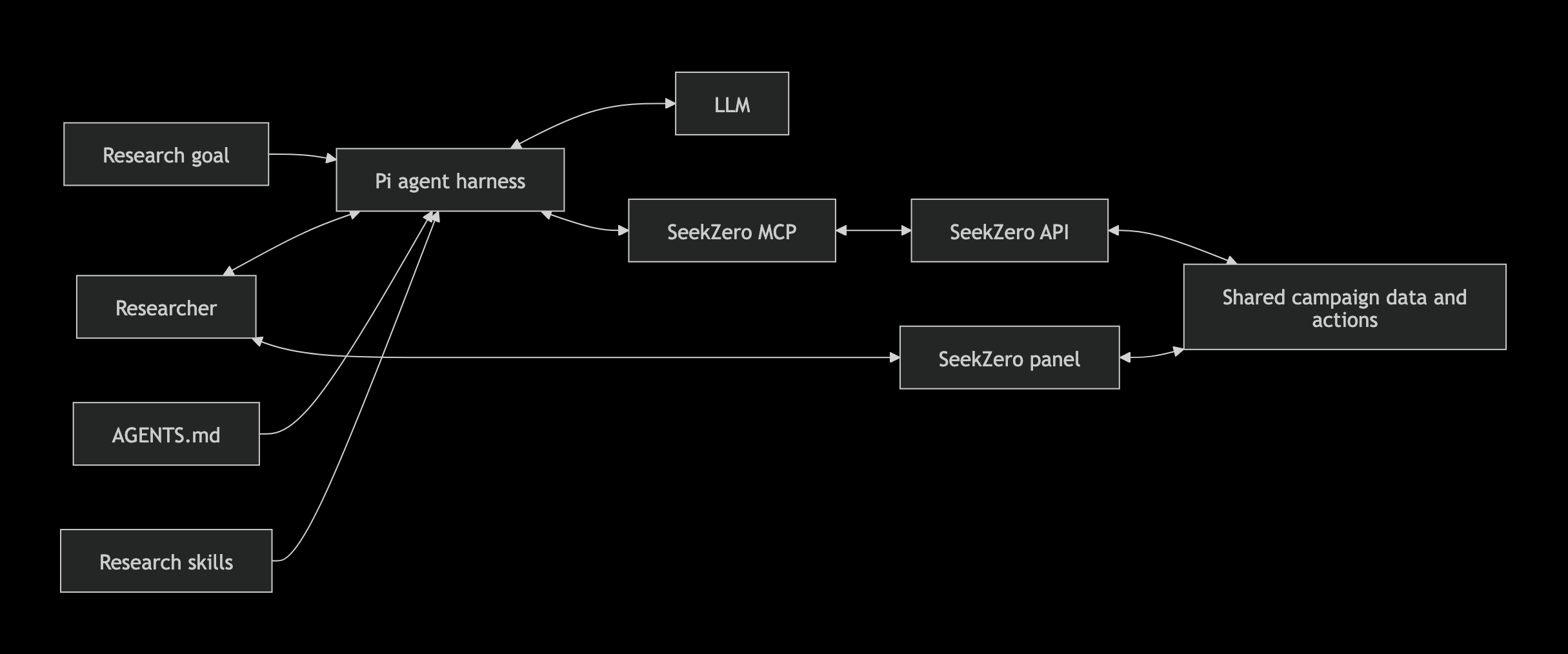
Architecture of the interactive research setup connecting the researcher, Pi, the LLM, MCP, and SeekZero.
Bytecode mismatches will be our running example. We will show how we turn a specific research area into a focused research goal, how the model reads current campaign data, and how it can suggest or preview the next test. The long-running agent loop will come later in the series.
1. The Goal: Bytecode Mismatch
Pi supports skills, self-contained packages of knowledge and instructions that the agent can load when needed. This allows us to gather information about the area we want to investigate, turn it into useful knowledge for the agent, and add it as a skill.
We have focused our research on bytecode mismatches: situations where V8 compiles the same JavaScript function multiple times and obtains different bytecode across compilations. These differences do not necessarily imply a vulnerability, but they can reveal inconsistencies in how V8 interprets or preserves information related to scope, variables, execution context, feedback slots, or other data associated with the bytecode. In some cases, those inconsistencies can point to a potential vulnerability.
This is an excerpt from the skill we use for the agent:
2. Connect Pi to SeekZero
SeekZero exposes its features through a REST API. A subset of those endpoints is made available to Pi as tools, and each user issues a key that Pi authenticates with. Through this integration, Pi can operate SeekZero the same way a researcher would.

SeekZero campaign dashboard for the Bytecode Research campaign.
Each campaign has a corpus of JavaScript samples that can come from researcher uploads or from samples generated and retained during execution. Pi can search through them and inspect their structures. For example, in the case of bytecode mismatches, this allows the agent to find files matching the specifications given in the skill and increase their priority so they are more likely to be selected as inputs for mutation.

JavaScript sample from the Bytecode Research campaign corpus.
If we want to include crashes in the research, Pi can query reports, reproduction attempts, and reduced samples and use them to check whether a crash is related to the bug being investigated. If they are not needed, these operations can be left out of the capabilities available to the agent.
Coverage makes it possible to relate a sample to the V8 code it reached and its execution order. Pi can start from a sample to see which code blocks it executed from a V8 source file and use that to determine whether the file meets the campaign objectives. One example would be detecting whether the sample managed to generate feedback slots by checking whether the coverage executed the V8 function that generates those structures.

V8 C++ code coverage reached by the sample, including functions related to Feedback Vector slots.
Pi can also use APIs that control the generation of new JavaScript samples to steer the campaign toward the target goal, for example by generating mutation plans, uploading new samples, changing priorities, or adjusting the configuration.

SeekZero configuration for the FunctionDeclaration AST node.
When adjusting the configuration or a Mutation Plan, the agent can use the Preview to see how samples would be generated before applying the changes to the campaign. Once running, the Run Observer shows the activity of the executors, including the selected input samples, the mutations applied to them, and the resulting Timeline as a sequence of diffs.
3. Turn the API Into MCP Tools
We built a small MCP server that exposes selected SeekZero operations as tools with names and arguments that are recognizable to Pi.
MCP, or Model Context Protocol, provides the agent with a standard way to discover and use these tools. For example, the following tools allow it to retrieve a specific sample from a campaign:
This means the researcher can ask a normal question:
Pi sends the question to the LLM together with the available tools. From there, the model reasons about what it needs: it can retrieve the sample, use get_sample_ast to obtain the AST, and execute the file to check its coverage.
The MCP tools are Python functions. This simplified excerpt from get_sample_ast shows the main idea:
The tool retrieves the sample and asks SeekZero to parse it. It then returns node counts and the AST to the model.
It is important for the MCP tools to summarize API responses before returning them to Pi. This reduces the number of tokens and avoids filling the context with unnecessary information.
In AGENTS.md we define which tools are available, when to use each one, and what level of detail to request. We also include rules for sensitive operations, such as configuration changes, so the agent does not have to receive these instructions in every prompt.
Each call to Pi is recorded in a local log, including the tool used, its arguments, the result, and whether a change was ultimately confirmed.
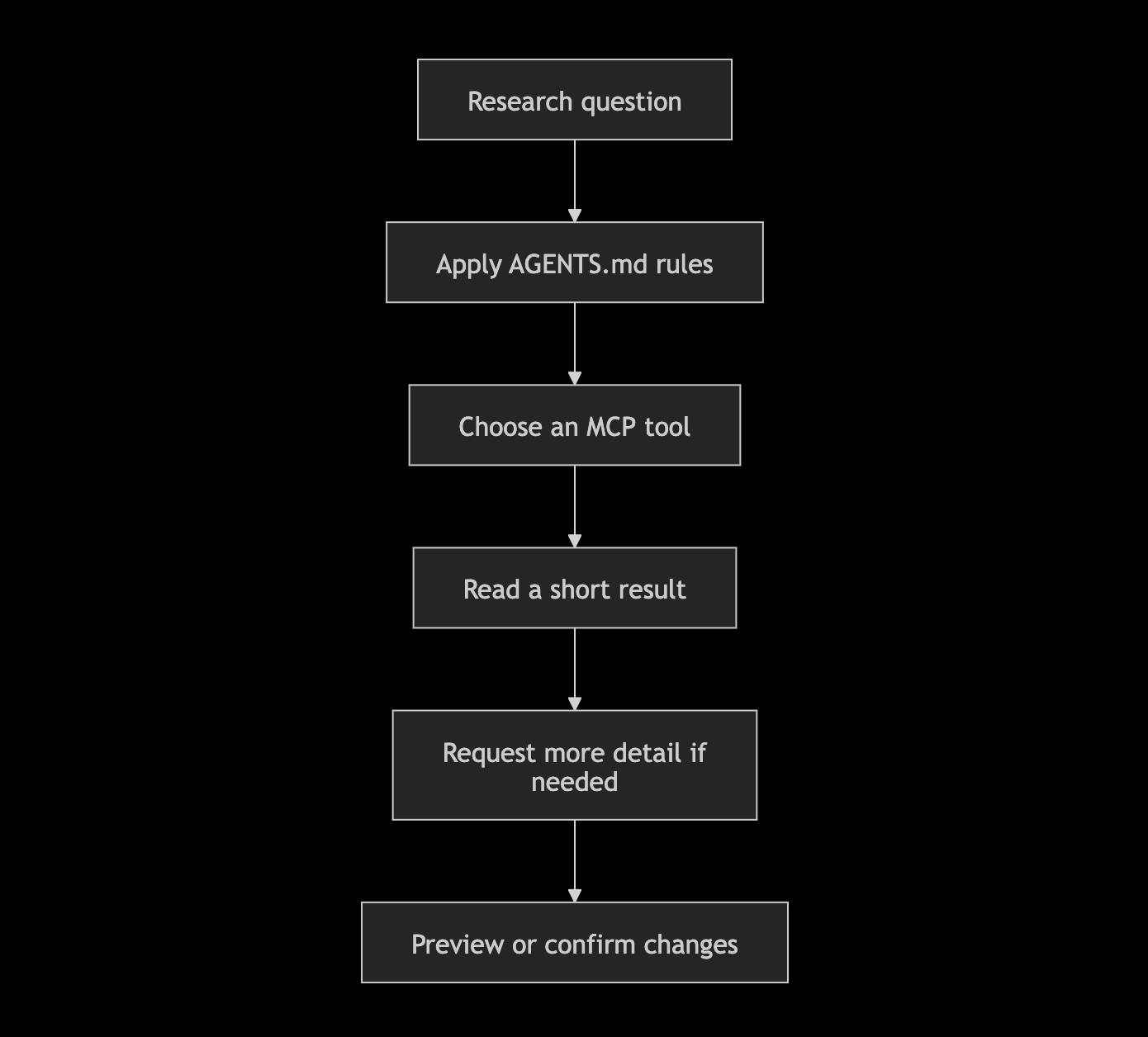
Agent workflow for answering a research question, selecting MCP tools, and previewing or confirming changes.
The prompt provides the campaign and the research question, AGENTS.md guides Pi on how to use the tools, and the MCP server makes the calls to SeekZero.
Demo: MCP Interaction
In the following video we show a very basic interaction with the Agent. First, we start Pi and ask it to list the SeekZero campaigns it has access to. Then we ask it to print a sample and finally, we change its priority to “High” so the campaign selects it more frequently during execution.
4. SeekZero Configuration
To be able to direct what SeekZero generates, we internally structured the generator around the nodes that make up the AST. We use an ESTree-based representation and Babel’s naming convention, so elements such as FunctionDeclaration, CallExpression, ForStatement, or BinaryExpression become pieces that we can control from the configuration.
The idea is simple: if the code SeekZero generates can be described as a tree, we can expose that same tree to the researcher and let them decide which parts they want to favor, limit, or combine. Each node is configurable, including the mutations associated with it. This way, the configuration stops being a set of abstract parameters and instead directly represents the structures that will ultimately appear in the samples.
From the configuration panel we can explore these nodes, adjust their values, and modify how each one participates in generation. In addition, the preview lets us immediately generate some samples with the current configuration and see how those changes translate into JavaScript code.
In this way, the researcher and SeekZero work on the same representation of the code. That same representation is what we will use next to teach the agent how to operate the configuration.
Demo: Configuring Sample Generation
In the following video we walk through the configuration using a ClassDeclaration as an example. We adjust the elements of the class and its body. We include class properties in the body, configuring different characteristics and their mutations.
Throughout the process, we use the preview to generate samples with the current configuration and check whether the changes are taking generation in the direction we want.
4.1 Teaching the Agent to Use the Configuration
The way we teach the agent is quite similar to how we would teach a researcher to work with SeekZero. First, we teach it how to use the configuration panel: which options exist, how weighted choices work, how to perform bulk operations and, in general, how to express the changes we want to make.
Once it knows those pieces, the next step is to teach it how to use them to achieve specific goals. To do this, we explain how each configuration change ultimately affects the AST of the samples generated by SeekZero. This way, starting from an AST that we want to reproduce, the agent can reason about which adjustments it needs to make in the configuration to get closer to it.
4.2 From Research to a Configuration
The researcher investigates a specific area, gathers information, studies previous vulnerabilities, and builds a collection of samples, such as known bugs and vulnerabilities. With that material, they can create a Skill that gives the agent the context it needs to work in that area.
From there, we can ask the agent to use that knowledge to generate a SeekZero configuration aimed at exploring similar structures.
The agent analyzes the samples and available information, identifies the patterns it considers relevant, and starts translating them into the configuration. Because it also has access to SeekZero’s preview, it can check what code is being generated and its mutations, adjust the configuration, and repeat the process until it gets closer to the structures it is looking for.
When it finishes, it saves the configuration as a preset. The researcher can open it, review the changes, and understand what the agent decided to prioritize before applying it to a campaign.
We like this flow because the researcher still sets the direction. The knowledge they gather is transformed into a concrete configuration that the agent can propose and refine inside SeekZero, but that the researcher can review, understand, and modify before using it.
Demo: From JavaScript Sample to SeekZero Configuration
In this final video we give the agent a sample as a reference:
The agent analyzes its structure and generates a SeekZero configuration aimed at producing similar samples. When it finishes, the agent saves the result as a preset, which we can view from the SeekZero panel.
This flow shows how the agent can steer a campaign configuration based on the analysis of a sample.
Conclusion
In this post we connected the agent to SeekZero and gave it the tools it needs to work on a campaign. We also used Skills to teach it how to use those tools and how to interpret the configuration.
Configuration plays an important role in SeekZero because it customizes the JavaScript structures we want to generate. The agent can start from the knowledge gathered during research, translate it into a configuration, check the result with the preview, and leave a preset that the researcher can review before using it.
In Part 3 we will see how we take this flow into real research on bytecode mismatches. We will use other SeekZero components such as Playground, Mutation Plans, and Code Targeting, and show our Skill Generator, which transforms commits, documentation, samples, and other research materials into a Skill for the agent.
In the final part we will see how the agent uses all this knowledge inside a real SeekZero campaign.
AI Browser Vulnerability Research
Part 2
Teaching an LLM to Find Browser Bugs
AI Browser Vulnerability Research
Part 2
Teaching an LLM to Find Browser Bugs
A large language model can understand and analyze a browser’s source code. If the model is trained on patterns from known vulnerabilities, it can even detect bugs given the right context and instructions. As we saw in the first part of this series, model-assisted code reading can already be used to discover real vulnerabilities.
One of the keys to fuzzing is that it measures the browser’s reliability at runtime. A JavaScript engine maintains a large number of states that constantly change during code execution. Fuzzing helps us discover bugs that depend on uncommon combinations of syntax, object state, and execution order, and it has proven especially effective at finding complex vulnerabilities in browsers.
The problem is that, with traditional fuzzing, much of that process happens inside a black box where the fuzzer generates, mutates, and executes samples, but the researcher has limited control and visibility over how to direct that work toward a specific goal. That’s why we built SeekZero.
SeekZero: The Campaign Infrastructure
SeekZero is a framework for vulnerability research in JavaScript engines and the infrastructure where researchers and agents run campaigns. A campaign brings together the target engine, its execution configuration, a corpus of JavaScript samples, the rules used to generate new samples, and the results obtained by executing them.
A campaign can start in two ways. SeekZero can generate an initial corpus from scratch based on the campaign configuration, or the researcher can upload existing JavaScript samples. From there, the corpus grows as SeekZero creates and executes new variants and keeps the ones that prove useful.
Sample generation and mutation are controlled through the configuration. Researchers can modify which JavaScript constructs are generated, how often they appear, and how existing samples are mutated. These controls are available through the SeekZero panel and API, allowing a researcher or agent to inspect and direct the campaign.
Each generated sample can also include a mutation plan. The plan describes how SeekZero should derive new variants from that sample, including the selected mutation rules and relevant targets. This makes the path from a useful sample to its future variants visible and controllable.
SeekZero also provides a testing environment for evaluating individual samples outside the main fuzzing loop. A researcher can execute a sample with specific execution options, inspect its output and coverage, and add it to the campaign corpus if it is worth keeping. Target selection keeps generation and execution focused on the current research goal, while monitoring shows what the campaign is doing.
SeekZero also works as a shared working environment where the researcher and the agent actively collaborate on the same campaign. The researcher sets the direction, evaluates findings, and decides which changes to make. The agent can search campaign data, relate findings across samples, and suggest what should be inspected or tested next.
Pi: The Agent Harness
We use Pi as the agent harness for our interactive research session. Pi is a minimal, extensible terminal coding harness. In this project, we connect Pi to a locally hosted model through vLLM and give the model access to SeekZero through MCP.
AGENTS.md explains how the SeekZero tools should be used, while research skills provide reusable V8 knowledge. The researcher supplies the goal, the model decides what to inspect or test, MCP translates its tool calls into API requests and SeekZero performs the campaign operations.
Architecture of the interactive research setup connecting the researcher, Pi, the LLM, MCP, and SeekZero.
Bytecode mismatches will be our running example. We will show how we turn a specific research area into a focused research goal, how the model reads current campaign data, and how it can suggest or preview the next test. The long-running agent loop will come later in the series.
1. The Goal: Bytecode Mismatch
Pi supports skills, self-contained packages of knowledge and instructions that the agent can load when needed. This allows us to gather information about the area we want to investigate, turn it into useful knowledge for the agent, and add it as a skill.
We have focused our research on bytecode mismatches: situations where V8 compiles the same JavaScript function multiple times and obtains different bytecode across compilations. These differences do not necessarily imply a vulnerability, but they can reveal inconsistencies in how V8 interprets or preserves information related to scope, variables, execution context, feedback slots, or other data associated with the bytecode. In some cases, those inconsistencies can point to a potential vulnerability.
This is an excerpt from the skill we use for the agent:
2. Connect Pi to SeekZero
SeekZero exposes its features through a REST API. A subset of those endpoints is made available to Pi as tools, and each user issues a key that Pi authenticates with. Through this integration, Pi can operate SeekZero the same way a researcher would.
SeekZero campaign dashboard for the Bytecode Research campaign.
Each campaign has a corpus of JavaScript samples that can come from researcher uploads or from samples generated and retained during execution. Pi can search through them and inspect their structures. For example, in the case of bytecode mismatches, this allows the agent to find files matching the specifications given in the skill and increase their priority so they are more likely to be selected as inputs for mutation.
JavaScript sample from the Bytecode Research campaign corpus.
If we want to include crashes in the research, Pi can query reports, reproduction attempts, and reduced samples and use them to check whether a crash is related to the bug being investigated. If they are not needed, these operations can be left out of the capabilities available to the agent.
Coverage makes it possible to relate a sample to the V8 code it reached and its execution order. Pi can start from a sample to see which code blocks it executed from a V8 source file and use that to determine whether the file meets the campaign objectives. One example would be detecting whether the sample managed to generate feedback slots by checking whether the coverage executed the V8 function that generates those structures.
V8 C++ code coverage reached by the sample, including functions related to Feedback Vector slots.
Pi can also use APIs that control the generation of new JavaScript samples to steer the campaign toward the target goal, for example by generating mutation plans, uploading new samples, changing priorities, or adjusting the configuration.
SeekZero configuration for the FunctionDeclaration AST node.
When adjusting the configuration or a Mutation Plan, the agent can use the Preview to see how samples would be generated before applying the changes to the campaign. Once running, the Run Observer shows the activity of the executors, including the selected input samples, the mutations applied to them, and the resulting Timeline as a sequence of diffs.
3. Turn the API Into MCP Tools
We built a small MCP server that exposes selected SeekZero operations as tools with names and arguments that are recognizable to Pi.
MCP, or Model Context Protocol, provides the agent with a standard way to discover and use these tools. For example, the following tools allow it to retrieve a specific sample from a campaign:
This means the researcher can ask a normal question:
Pi sends the question to the LLM together with the available tools. From there, the model reasons about what it needs: it can retrieve the sample, use get_sample_ast to obtain the AST, and execute the file to check its coverage.
The MCP tools are Python functions. This simplified excerpt from get_sample_ast shows the main idea:
The tool retrieves the sample and asks SeekZero to parse it. It then returns node counts and the AST to the model.
It is important for the MCP tools to summarize API responses before returning them to Pi. This reduces the number of tokens and avoids filling the context with unnecessary information.
In AGENTS.md we define which tools are available, when to use each one, and what level of detail to request. We also include rules for sensitive operations, such as configuration changes, so the agent does not have to receive these instructions in every prompt.
Each call to Pi is recorded in a local log, including the tool used, its arguments, the result, and whether a change was ultimately confirmed.
Agent workflow for answering a research question, selecting MCP tools, and previewing or confirming changes.
The prompt provides the campaign and the research question, AGENTS.md guides Pi on how to use the tools, and the MCP server makes the calls to SeekZero.
Demo: MCP Interaction
In the following video we show a very basic interaction with the Agent. First, we start Pi and ask it to list the SeekZero campaigns it has access to. Then we ask it to print a sample and finally, we change its priority to “High” so the campaign selects it more frequently during execution.
4. SeekZero Configuration
To be able to direct what SeekZero generates, we internally structured the generator around the nodes that make up the AST. We use an ESTree-based representation and Babel’s naming convention, so elements such as FunctionDeclaration, CallExpression, ForStatement, or BinaryExpression become pieces that we can control from the configuration.
The idea is simple: if the code SeekZero generates can be described as a tree, we can expose that same tree to the researcher and let them decide which parts they want to favor, limit, or combine. Each node is configurable, including the mutations associated with it. This way, the configuration stops being a set of abstract parameters and instead directly represents the structures that will ultimately appear in the samples.
From the configuration panel we can explore these nodes, adjust their values, and modify how each one participates in generation. In addition, the preview lets us immediately generate some samples with the current configuration and see how those changes translate into JavaScript code.
In this way, the researcher and SeekZero work on the same representation of the code. That same representation is what we will use next to teach the agent how to operate the configuration.
Demo: Configuring Sample Generation
In the following video we walk through the configuration using a ClassDeclaration as an example. We adjust the elements of the class and its body. We include class properties in the body, configuring different characteristics and their mutations.
Throughout the process, we use the preview to generate samples with the current configuration and check whether the changes are taking generation in the direction we want.
4.1 Teaching the Agent to Use the Configuration
The way we teach the agent is quite similar to how we would teach a researcher to work with SeekZero. First, we teach it how to use the configuration panel: which options exist, how weighted choices work, how to perform bulk operations and, in general, how to express the changes we want to make.
Once it knows those pieces, the next step is to teach it how to use them to achieve specific goals. To do this, we explain how each configuration change ultimately affects the AST of the samples generated by SeekZero. This way, starting from an AST that we want to reproduce, the agent can reason about which adjustments it needs to make in the configuration to get closer to it.
4.2 From Research to a Configuration
The researcher investigates a specific area, gathers information, studies previous vulnerabilities, and builds a collection of samples, such as known bugs and vulnerabilities. With that material, they can create a Skill that gives the agent the context it needs to work in that area.
From there, we can ask the agent to use that knowledge to generate a SeekZero configuration aimed at exploring similar structures.
The agent analyzes the samples and available information, identifies the patterns it considers relevant, and starts translating them into the configuration. Because it also has access to SeekZero’s preview, it can check what code is being generated and its mutations, adjust the configuration, and repeat the process until it gets closer to the structures it is looking for.
When it finishes, it saves the configuration as a preset. The researcher can open it, review the changes, and understand what the agent decided to prioritize before applying it to a campaign.
We like this flow because the researcher still sets the direction. The knowledge they gather is transformed into a concrete configuration that the agent can propose and refine inside SeekZero, but that the researcher can review, understand, and modify before using it.
Demo: From JavaScript Sample to SeekZero Configuration
In this final video we give the agent a sample as a reference:
The agent analyzes its structure and generates a SeekZero configuration aimed at producing similar samples. When it finishes, the agent saves the result as a preset, which we can view from the SeekZero panel.
This flow shows how the agent can steer a campaign configuration based on the analysis of a sample.
Conclusion
In this post we connected the agent to SeekZero and gave it the tools it needs to work on a campaign. We also used Skills to teach it how to use those tools and how to interpret the configuration.
Configuration plays an important role in SeekZero because it customizes the JavaScript structures we want to generate. The agent can start from the knowledge gathered during research, translate it into a configuration, check the result with the preview, and leave a preset that the researcher can review before using it.
In Part 3 we will see how we take this flow into real research on bytecode mismatches. We will use other SeekZero components such as Playground, Mutation Plans, and Code Targeting, and show our Skill Generator, which transforms commits, documentation, samples, and other research materials into a Skill for the agent.
In the final part we will see how the agent uses all this knowledge inside a real SeekZero campaign.